RAID 0 - Stripe
SoftRAID stripe volumes give you the highest possible performance. However, they provide no protection from disk failure, regular backups are required for RAID volumes, because there is no redundancy. When a disk fails on a stripe volume, you will lose all the files on the volume. Stripe volumes are great for scratch files or when you have readily available backups of the files on your volume. Because a stripe volume isn’t protected against disk failure, frequent, regular backups are required with RAID 0 volumes.
How stripes work
Stripe volumes, also known as RAID 0 volumes, spread the data for a volume over 2 or more disks. Each disk contains only part of the volume. When reading or writing a large file, the request gets sent to all of the disks at the same time. Each disk is asked to send back just the part of the file which it holds. The disks work simultaneously, in parallel, each disk reading just a small part of the file. Because of this, read and write speeds are a fraction of what they would be if a single disk had to be accessed for the entire file. A stripe volume cannot work unless all of its disks are present and working correctly.
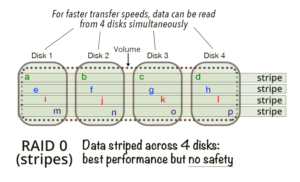
Stripe Unit Size In a stripe volume, data is spread across the volume’s disks in blocks. The first block of the volume is on the first disk, the second is on the second disk, etc. The size of each block is called the “stripe unit size.”
When you create a SoftRAID stripe volume, you will be asked to select the stripe unit size for your new volume. SoftRAID will help you choose the correct value depending on the type of files you plan to store on your stripe volume.
We recommend stripe volumes for…
We recommend stripe volumes ONLY for temporary storage – ie for any application where speed is most important and you have a recent backup. A great use for a stripe volume is as a scratch disk when using Photoshop, Lightroom, or editing uncompressed video; it will give you the fastest possible scratch disk for these purposes.
RAID 0 is not a good solution for permanent storage. For this, and all other uses, particularly where the safety of your data is an issue, we recommend you use a RAID level which protects your volume from disk failure. With SoftRAID, these are mirror (RAID 1), RAID 4, RAID 5, and RAID 1+0 volumes.
RAID 1 - Mirrors
SoftRAID mirror volumes give you the greatest level of reliability.
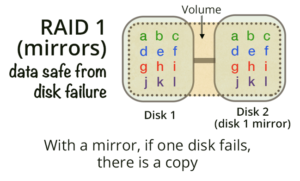
Each disk in a mirror volume contains an entire copy of the volume.
How mirrors work
A mirrored volume uses two or more disks to create a volume that is protected from disk failure. Unlike stripe volumes, each disk contains a copy of the entire volume. As long as at least one of the mirror volume’s disks is still working and attached to your Mac, the volume is safe and will function normally.
SoftRAID automatically keeps track of which disks are attached to your Mac at any time and will correctly rebuild missing disks when they are re-attached to your Mac.
Creating the fastest possible mirror volume
You can create fast mirror volumes, for starting up your Mac or for storing files you frequently use, by combining an SSD with a normal hard disk. The SSD gives you incredibly fast read speeds and the normal hard disk gives you the redundant storage which protects your files from disk failure.
SoftRAID automatically configures the mirror volume for the fastest possible performance by having the reads come only from the SSD
SoftRAID has complete support for SSDs. Unlike many RAID systems, SoftRAID supports TRIM commands on all SoftRAID volumes. The SoftRAID Monitor will also warn you when the flash memory on an SSD is worn out.
SoftRAID’s Fast Mirror Rebuilds
With most RAID systems, rebuilding a volume takes a long time. Rebuilding a multi-terabyte mirror volume can often take a day or longer.
With SoftRAID’s Fast Mirror Rebuilds, rebuilds can take less than an hour. Whenever a disk is missing from a mirror, SoftRAID remembers which blocks of data are written to the volume while the disk is missing. When the disk is reattached, SoftRAID only rebuilds those blocks, rather than rebuilding the entire volume. Rebuilds which might take days with other RAID systems take less than an hour with SoftRAID.
We recommend mirror volumes for…
We recommend mirror volumes for all important files. If your business depends on the files stored on your Mac, you should be using a mirror volume. With a mirror volume, if a disk fails, you can keep working as the remaining disks will take over. For the greatest reliability, we recommend a 3 disk mirror..
RAID 4 and 5 – Stripes with dedicated or distributed parity
RAID 4 and RAID 5 volumes give you very high performance while still protecting your volume from disk failure. They are a great choice if you need high performance for writing large files or for reading files of any size. If you are using SSDs, RAID 4 is preferable to RAID 5; with SSDs, RAID 4 reads are up to 20% quicker, so it’s great for things like large video files that need to be read fast.
RAID 4 and RAID 5 are good for reading small files which are frequently read. They are not a good choice if you need to write a lot of small files as fast as possible. If you need to write many small files, we suggest you use RAID 1+0
How RAID 4 and RAID 5 volumes work
RAID 4 and RAID 5 volumes are similar to stripe (RAID 0) volumes in that they spread the file data across all the disks used for a volume. However, RAID 4 and RAID 5 volumes generate and store parity information for data saved to them. This parity information can be used to recreate the data on a disk that has failed.
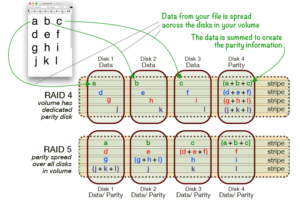
Parity information is created for each block of file data and written to the volume’s disks (see below for the way RAID 4 and RAID 5 do this differently). Parity information for a block of data is calculated by summing all the data on each disk for that block.
When a disk fails on a RAID 4 or RAID 5 volume, SoftRAID can take the file data from the remaining disks, along with the parity information, and regenerate the file data on the missing disk.
A simple example: imagine your volume contains 3 bytes of data – a, b and c – with values of 10, 20, and 30 respectively. The parity information for that byte will be the sum of those values, ie 60. The data is spread over the disks in the volume, so that a, b, c, and their parity information are never on the same disk. If the disk storing byte c fails, its value can be easily calculated by subtracting the combined values of bytes a and b from the parity information (which holds the sum of bytes a, b, and c).
What is the difference between RAID 4 and RAID 5?
The main difference between RAID 4 and RAID 5 volumes is how they store the parity information associated with the data on the disks.
RAID 4: The parity information for a RAID 4 volume is written to a dedicated disk called the “parity disk.” The other disks in a RAID 4 volume are called “data disks” as they store the file data for the volume. The parity disk is only ever read from if one of the data disks fails. This means that reading large files from RAID 4 volumes only uses the data disks.
Because only the data disks are read from, RAID 4 volumes on SSD or NVMe drives can be up to 20% faster at reading than RAID 5 volumes, although this speed increase depends on the type of disk used and is most often seen with SSDs.
RAID 5: The parity information for a RAID 5 volume is distributed among all the disks of the volume. Each block of data, along with parity information for that block, can be written to anyone of the volume’s disks. So, unlike RAID 4 volumes, reading large files on a RAID 5 volume uses all the disks in that volume. Normally using more disks would make reading data faster, but with RAID 5 time is spent reading parity information which won’t be needed unless there’s a disk failure, thus reducing the speed of actual data read.
In all other respects (aside from how they deal with parity) RAID 4 and RAID 5 volumes are identical.
We recommend RAID 4 and RAID 5 volumes for…
We recommend RAID 4 and RAID 5 volumes for video editing, animation studios, digital photography, prepress and graphic arts. They are a great solution where you need the maximum amount of storage space, the highest performance, and protection against disk failure. With RAID 4 and RAID 5, the volume will keep working even after a disk gets an error or fails completely.
RAID 1+0 (10) – Stripes with Mirrored Pairs
RAID 1+0 volumes are ideal for business customers who want the ultimate combination of speed and safety that this kind of volume provides. With SoftRAID, you can create RAID 1+0 volumes with up to 16 disks ie. 8 mirrored pairs.
How RAID 1+0 volumes work
RAID 1+0 volumes are made up of pairs of disks. Each pair, called a mirror pair, contains two disks that have identical information. If one disk in a mirror pair fails, the volume can keep reading and writing your files because it will use the other disk in the mirror pair instead.
The increased speed of RAID 1+0 volumes comes from striping mirrored pairs of disks together. Instead of striping together individual disks, like a stripe (RAID 0) volume, a RAID 1+0 volume treats each mirror pair just like a single disk of a stripe volume. RAID 1+0 volumes can only be made with even numbers of disks and require at least 4 disks.
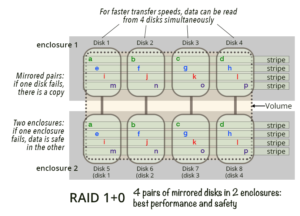
Stripe Unit Size. In a RAID 1+0 volume, data is spread across the volume’s mirrored pairs of disks in blocks. The first block of the volume is on the first pair of mirrored disks, the second is on the second pair, etc. The size of each block is called the “stripe unit size.”
When you create a SoftRAID RAID 1+0 volume, you will be asked to select the stripe unit size for your new volume. SoftRAID will help you choose the correct value depending on the type of files you plan to store on your stripe volume.
Creating a more reliable RAID 1+0 volume
You can create a RAID 1+0 volume with disks in two enclosures by setting the primary RAID 0 disks in one enclosure and the secondary disks in the other enclosure. If the power supply, cables or disk interface in one enclosure fails, your RAID 1+0 volume will continue to work. A RAID 1+0 volume using two disk enclosures gives you the most protection from all types of hardware failure.
SoftRAID’s BLINK DISK LIGHT feature
The Blink Disk Light feature makes it super easy to create RAID 1+0 volume across two enclosures. In the SoftRAID application UI, disks are represented by tiles; when a tile is selected, the application will simultaneously blink a light, both on the tile, and the disk that is represented by the tile, making it really quick and easy to select which disks to use and find out which disks are in which enclosures. The blink disk light feature simplifies the complexity of creating a RAID 1+0 volume, making it easy to pick corresponding disks in two different enclosures for your RAID 1+0 mirrored pair(s). Use SoftRAID’s “Disk Label” feature to give disks in each enclosure unique identifiers.
We recommend RAID 1+0 volumes for…
We recommend RAID 1+0 volumes for any application where you want high performance and increased reliability. This is the RAID level we recommend for all our business customers.